TABLE OF CONTENT
Most Clawbot installations fail within the first 48 hours—not because the software is broken, but because teams skip the fundamentals. I've watched companies rush through installation in 20 minutes, only to spend weeks troubleshooting security vulnerabilities, permission conflicts, and gateway crashes that could have been avoided with proper planning. The difference between a Clawbot deployment that becomes critical infrastructure and one that gets abandoned after the first demo comes down to how seriously you take the installation process.
Clawbot isn't just another AI chatbot you add to Slack. It's autonomous AI infrastructure that runs on your servers, executes shell commands, controls browsers, manages files, and integrates with your entire digital ecosystem. When installed properly, it becomes one of your most valuable operators—monitoring processes, handling repetitive decisions, and keeping workflows moving 24/7. When installed carelessly, it becomes a security nightmare with root access to your systems. At Neuramonks, we've deployed AI solutions and agentic AI systems for enterprises that understand this distinction, and what I've learned is simple: the "fast way" creates technical debt you'll regret within days.
This guide walks through enterprise-grade Clawbot installation—the approach that prioritizes security, reliability, and long-term operational success over quick demos. If you're serious about deploying AI infrastructure that actually works in production environments, keep reading.
Why Most Clawbot Installations Fail in Production
The "fast way" to install Clawbot device infrastructure feels productive in the moment—copy a command, paste it into your terminal, watch packages download, and boom, you're running AI on your laptop. Then reality hits. Here are the most common mistakes that break deployments before they ever reach production:
- Outdated Node.js versions: Clawbot requires Node.js 22 or higher for modern JavaScript features. Installing on Node 18 or 20 is the single most common cause of cryptic build failures, and I've seen teams waste entire days debugging issues that a simple node --version check would have prevented.
- Missing build tools and dependencies: The installation process compiles native modules like better-sqlite3 and sharp. Without proper build tools (Python, node-gyp, compiler toolchains), these compilations fail silently or throw errors that look like Clawbot bugs when they're actually environment problems.
- Wrong installation environment: Developers install Clawbot on their personal laptops "just to try it out," then wonder why it's unreliable when their machine sleeps, why performance degrades when they're running other applications, or why security teams panic when they discover an AI agent with full system access on an unmanaged device.
- Skipping the onboarding wizard: The openclaw onboard command isn't optional busywork—it configures critical security boundaries, permission models, and API authentication. Teams that bypass this step end up with misconfigured agents that either can't do anything useful or have dangerously broad access.
- Permission errors and npm conflicts: Running installations with wrong user accounts, system-level npm directories that require sudo, or conflicting global packages creates EACCES errors that block deployment. What should take 10 minutes stretches into hours of permission troubleshooting.
- Exposed admin endpoints: Here's the scary one—hundreds of Clawbot gateways have been found exposed on Shodan because teams didn't configure proper gateway binding. Default installations that bind to 0.0.0.0 instead of loopback turn your AI agent into an open door for anyone scanning the internet.
These aren't theoretical risks. I've seen production deployments compromised, AI agents making unauthorized changes, and companies abandoning Clawbot entirely after rushed installations created more problems than they solved. The pattern is always the same: teams prioritize speed over structure, then spend 10x the time fixing preventable issues.
Stop Planning AI.
Start Profiting From It.
Every day without intelligent automation costs you revenue, market share, and momentum. Get a custom AI roadmap with clear value projections and measurable returns for your business.
Understanding Clawbot's Architecture Before You Install
Before you install Clawbot device infrastructure, you need to understand what you're actually deploying. This isn't a web app you can uninstall if things go wrong—it's a persistent AI operator with deep system access. Here's what makes Clawbot fundamentally different from traditional AI assistants:
- Infrastructure ownership and privacy-first design: Unlike ChatGPT or Claude.ai, Clawbot runs entirely on hardware you control. Your conversations, documents, and operational data never touch third-party servers unless you explicitly configure external AI APIs. This is true data sovereignty—no company is mining your interactions, and no terms-of-service update can suddenly change what happens to your information.
- Autonomous execution beyond conversation: Clawbot doesn't just answer questions—it directly manipulates your systems. It executes shell commands, writes and modifies code, controls browser sessions, manages files, accesses cameras and location services, and integrates with production services. If Anything runnable in Node.js — Clawbot can coordinate. This power is exactly why installation matters so much.
- Multi-platform integration with unified memory: You can communicate with your Clawbot instance through WhatsApp, Telegram, Discord, Slack, Signal, iMessage, and 15+ other platforms. Conversations maintain context across all channels, so you can start a task on Slack at your desk and follow up via WhatsApp during your commute. This unified presence requires proper gateway configuration to work reliably.
- Full system access with extensible capabilities: Clawbot integrates with over 50 services through its skills ecosystem, runs scheduled background tasks, monitors system resources, and executes workflows while you're offline. The ClawdHub marketplace hosts 565+ community-developed skills, and the system can build custom skills on demand for your specific requirements.
- Model-agnostic AI flexibility: Choose between Anthropic's Claude for sophisticated reasoning, OpenAI's GPT models for versatility, or completely free local models via Ollama. Switch AI providers without reconfiguring your entire deployment—the gateway architecture abstracts model selection from operational logic.
Understanding this architecture matters because it shapes your installation strategy. You're not setting up a chatbot—you're deploying AI infrastructure that needs security controls, monitoring, backup strategies, and operational governance. as AI Consulting Services we specializing in enterprise AI solutions, we've helped companies recognize this distinction before they rush into production deployments that compromise security or reliability.
The Right Way: Pre-Installation Requirements and Planning
Proper Clawbot installation starts before you touch a terminal. Here's the systematic pre-installation checklist that prevents 90% of the issues I see in production:
- System requirements verification: Confirm you're running Node.js 22 or higher with node --version. Check that you have adequate RAM (minimum 4GB, recommended 8GB+) and storage for models, logs, and workspace data. Verify that build tools are installed—on macOS this means Xcode Command Line Tools, on Linux it's build-essential and Python 3, on Windows it's Windows Build Tools or WSL2.
- Choose proper installation environment: Clawbot should run on a controlled server, private cloud instance, or isolated virtual machine—never a personal laptop for production use. The environment needs to be always-on, properly backed up, and secured with least-privilege access. Consider whether you'll host on-premise or use cloud VPS providers like Hetzner, DigitalOcean, or AWS.
- Network and security planning: Map out which ports your gateway will use (default 18789), how you'll handle firewall rules, whether you need VPN or Tailscale for remote access, and how to prevent public internet exposure. Plan your network segmentation so the Clawbot instance can access necessary services without having broader access than required.
- Access control strategy: Define who gets what permissions before installation. Will this be a shared organizational agent or individual instances per user? What approval workflows do you need for sensitive actions like database modifications, external API calls, or financial transactions? Document these policies now, not after someone makes an unauthorized change.
- Logging and monitoring infrastructure: Clawbot generates detailed logs for every action, API call, and system interaction. Plan where these logs will be stored, how long you'll retain them, who can access them, and whether you need integration with existing monitoring tools like Datadog, Grafana, or ELK stack. Without proper logging, troubleshooting becomes impossible.
- Backup and disaster recovery plan: Your Clawbot instance will accumulate conversation history, learned behaviors, custom skills, and integration configurations. Plan automated backups of your state directory (default ~/.openclaw) and workspace, define recovery time objectives, and test restoration procedures before you need them in production.
This planning phase typically takes 2-4 hours for small deployments and a full day for enterprise environments. Teams that skip it inevitably spend weeks fixing issues that proper planning would have prevented. As an AI development company, Neuramonks includes this planning phase in every client engagement because we've seen firsthand what happens when organizations skip fundamentals to chase speed.
Step-by-Step Installation Process for Enterprise Deployment
With planning complete, here's the systematic installation workflow that creates production-ready Clawbot deployments:
- Install Node.js 22+ and verify build tools: Use nvm (Node Version Manager) or download directly from nodejs.org. After installation, run node --version and npm --version to confirm. Test that build tools are available with gcc --version (Linux/macOS) or verify Visual Studio Build Tools (Windows). Don't proceed until these fundamentals work.
- Run official installation script with proper flags: Use the official installer with verbose output: curl -fsSL https://openclaw.ai/install.sh | bash -s -- --verbose. The verbose flag shows exactly what's happening and makes troubleshooting easier if issues arise. Never pipe untrusted scripts to bash in production—review the install.sh contents first to understand what it does.
- Complete onboarding wizard thoroughly: Run openclaw onboard --install-daemon and work through every prompt carefully. Select your AI model provider (Claude, GPT, or local Ollama), configure messaging channels one at a time, set initial permission boundaries, and verify API keys are valid. The wizard handles critical security configuration—skipping steps here creates vulnerabilities.
- Configure least-privilege permissions: Start with minimal access and expand gradually. Enable file system access only to specific directories, restrict shell command execution to approved commands, require human approval for external API calls, and disable internet access for sensitive environments. You can always grant more permissions—revoking them after incidents is much harder.
- Set up secure gateway binding: Edit your configuration to bind the gateway to loopback (127.0.0.1) instead of 0.0.0.0. This single change prevents external network exposure while allowing local access and properly configured remote connections via VPN or Tailscale. Check your config file (typically ~/.openclaw/config.yaml) and explicitly set gateway.bind: "loopback".
- Connect messaging channels systematically: Add one messaging platform at a time—start with the channel you'll use most (often Telegram for technical teams or WhatsApp for broader access). Verify each integration works before adding the next. Test both sending and receiving messages, confirm authentication persists across gateway restarts, and validate that conversation history syncs properly.
- Test with low-risk tasks first: Your first operational test should be something that can't cause damage—create a file in a temporary folder, summarize a local text document, or query current system resources. Confirm the task completes successfully, verify you can see the action in logs, and check that results appear in your messaging platform as expected.
- Enable comprehensive logging and monitoring: Configure log levels to capture detailed execution traces, set up log rotation to prevent disk space issues, integrate with your monitoring stack to track gateway health and performance, and create alerts for suspicious activity patterns. What you don't log, you can't troubleshoot or audit.
At Neuramonks, we implement staged rollouts for enterprise clients—starting with restricted pilots, expanding to low-risk production tasks, and gradually enabling full autonomous operation only after the system proves reliable and secure. This phased approach dramatically reduces deployment risk while building organizational confidence in AI infrastructure.
Security Configuration That Actually Protects Your Infrastructure
Security isn't a feature you add after installation—it's the foundation you build on. Here's what enterprise-grade Clawbot security actually looks like:
- Gateway binding to loopback prevents internet exposure: Configure gateway.bind: "loopback" in your config file. This ensures the gateway only accepts connections from the same machine or through explicitly configured tunnels like Tailscale or VPN. Hundreds of Clawbot instances have been found on Shodan because teams left default 0.0.0.0 bindings that exposed admin endpoints to the entire internet.
- Least-privilege access policies limit blast radius: Grant only the minimum permissions necessary for each task. File access should be restricted to specific directories, shell commands should use allowlists rather than blocklists, and external API calls should require explicit approval. When incidents occur—and they will—proper permissions mean the damage stays contained.
- Human approval workflows for sensitive actions: Critical operations like database modifications, financial transactions, external communications, or infrastructure changes should always require human confirmation. Configure approval flows in your config file and test them thoroughly before enabling autonomous execution in production.
- Proper API key management and rotation: Store API keys in secure vaults like AWS Secrets Manager or HashiCorp Vault, never commit them to version control, rotate them regularly (quarterly at minimum), and monitor usage patterns for anomalies. Compromised API keys have led to massive unexpected bills when attackers use them for cryptocurrency mining or other abuse.
- Network segmentation isolates AI infrastructure: Run Clawbot in isolated network segments with firewall rules that explicitly allow only necessary connections. The AI agent doesn't need direct access to your production database, financial systems, or customer data stores—architect network access to match your actual requirements.
- Audit logging provides traceability and accountability: Every action, API call, and decision should be logged with sufficient detail to reconstruct what happened and why. Logs must include timestamps, the triggering message or event, the decision-making process, and the actual execution result. Without comprehensive logs, you can't investigate incidents, prove compliance, or improve system behavior over time.
Here's a comparison table showing the security differences between "fast way" and "right way" installations:
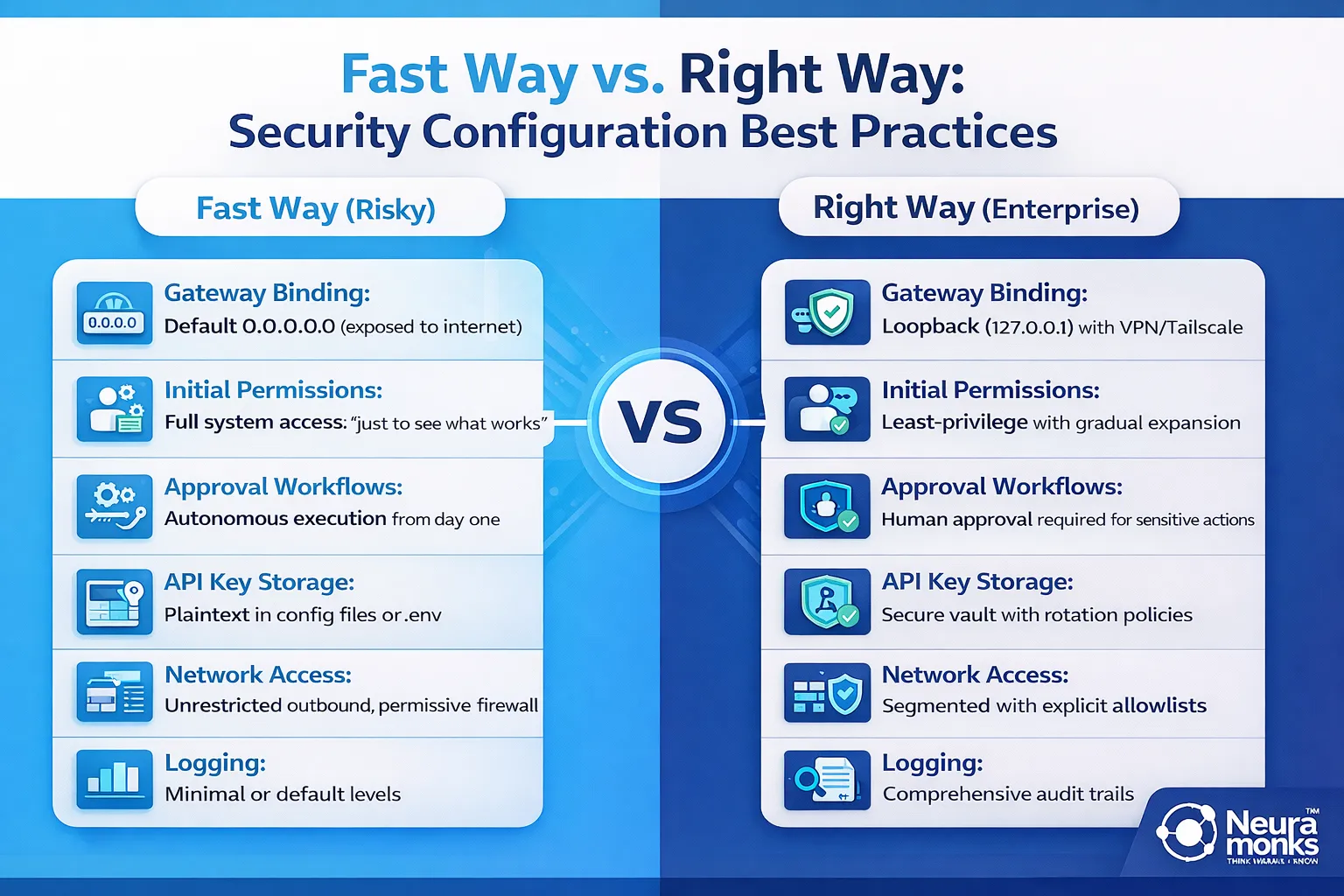
The "right way" takes a few extra hours during installation but prevents security incidents that can take weeks to remediate and damage organizational trust in AI infrastructure. Neuramonks specializes in deploying enterprise AI solutions with security architectures that satisfy compliance requirements, pass security audits, and maintain operational reliability under real-world conditions.
Final Thoughts: Beyond Installation to Operational Success
Installing Clawbot properly is just the beginning. The real value emerges over weeks and months as the system proves reliable, teams trust its decisions, and you gradually expand its autonomy into more complex workflows. Organizations that take the "right way" approach create AI infrastructure that becomes genuinely indispensable—quietly handling repetitive decisions, monitoring critical processes, and keeping operations moving 24/7 without constant human oversight.
What separates successful deployments from abandoned experiments? Proper installation that prioritizes security, systematic rollout that builds confidence, comprehensive monitoring that catches issues early, and ongoing optimization that expands capabilities as trust grows. Companies that skip these fundamentals end up with AI agents that break in production, create security vulnerabilities, or fail to deliver ROI because teams don't trust them enough to enable meaningful automation.
Your next steps after installation should focus on validation and gradual expansion. Monitor logs daily during the first week, run progressively more complex test tasks, document what works and what doesn't, gather feedback from users, and systematically address issues before they become patterns. Only after your Clawbot instance demonstrates consistent reliability should you consider expanding permissions or enabling autonomous execution in production workflows.
For startups and enterprises serious about deploying AI solutions that actually work in production environments, Neuramonks offers comprehensive AI consulting services that go far beyond basic installation. As an AI development company specializing in agentic AI systems, enterprise automation, and AI ML services, we help organizations navigate the complexity of production AI deployment—from initial architecture design through security configuration to operational governance and continuous optimization.
Ready to deploy Clawbot with enterprise-grade security and reliability? Our team at Neuramonks has successfully implemented AI infrastructure for companies across industries, turning experimental AI into production systems that deliver measurable business value. We handle the complexity—architecture planning, security hardening, permission frameworks, monitoring setup, and staged rollouts—so you get AI infrastructure that works from day one.
Contact Neuramonks today to discuss your AI deployment requirements, or schedule a consultation with our AI solutions team to explore how we can help you build autonomous AI infrastructure that your organization can actually trust in production.